
-
Getting Started
- What is Deposyt? Payments and CRM Platform Explained
- Glossary of Deposyt Terms
- Connect NMI to Deposyt CRM
- Connect Dejavoo Terminal to Deposyt CRM
- Connect Authorize.net to Deposyt CRM
- First 24 Hours Checklist
- CRM Account Types
- Create CRM Account
- CRM Setup Mistakes
- Connect Payment Method CRM
- CRM Dashboard Overview
- CRM Roles & Permissions
-
Payments / Merchant Account Setup
- High-Risk vs Low-Risk Accounts
- ACH vs Card Payments
- Dual Pricing: How It Works
- Surcharging Rules: What You Need to Know
- PCI Compliance Overview
- Fraud Prevention Basics
- Merchant Account Holds And Reserves
- Merchant Account Underwriting Process
- Merchant Account Approval Time
- Close Merchant Account
- Failed Payments & Dunning
- Payment Funding Schedule
- Merchant Account Overview
- Payment Processing Rates Explained
- KYB KYC Documents
- Supported Business Types: Payment Processing
- View More ( 1 ) Collapse Articles
-
CRM Basics (contacts, pipelines, tasks)
-
Appointments + Payments (your booking/pay flows)
- Appointment Deposits
- Appointment Statuses CRM
- Appointment Analytics CRM
- Booking Pages CRM
- Calendar Sync CRM
- No Show Handling Appointments
- Partial Payments Appointments
- Pay to Book vs Book to Pay
- Post Booking Automation
- Appointment Rescheduling & Cancellation Rules
- Collect Payment At Booking
- Appointment Types CRM
-
Invoices + Deposits + Subscriptions
- Invoice Due Date vs Send Date
- Failed Subscription Payments
- Auto-Pay Invoices
- Cancel Subscription CRM
- Dunning Software
- Subscription Reporting
- Invoice Statuses Explained
- Invoice Software For Small Business
- Split Invoices
- Refunds and Credits in Deposyt
- Subscription Billing Models
- Subscription Billing Software
- Invoice Deposits
- Subscription Upgrades & Downgrades
-
Terminals + In-Person Mode
-
Automations / Triggers
- Appointment Triggers CRM
- CRM Automation Basics
- CRM Automation Examples
- Conditional Logic CRM
- Automation Delays CRM
- Invoice & Subscription Triggers
- SMS Compliance TCPA
- Payment-Based Triggers in Deposyt
- Sales Triggers CRM Overview
- Smart Follow-Ups CRM
- SMS vs Email CRM
- Test CRM Automations
- Triggers and Actions in Deposyt CRM
-
Partners / Affiliate Tracking
- How to Set Up Your Partner Program
- How to Assign Partners to Sales (Invoices & Virtual Terminal)
- Understanding Users, Affiliates, and Partners in Deposyt
- Understanding Partner Signup Pages
- Unique Referral Links
- Revenue Splits Explained
- Dual Pricing & Affiliate Commissions
- Partner Dashboards
- Partner Payouts
- Partner Disputes
- Tracking & Attribution Logic
- Partner Analytics
- Managing Large Partner Networks
-
Chargebacks / Disputes
-
Calendar
- Accessing the Calendar
- Accessing the Calendar Archive
- Accessing Appointment Types from Calendar
- Accessing Availability from Calendar
- Accessing the Services Menu from Calendar
- Adding Notes to Calendar Appointments
- Assign Users to Calendar Appointments
- Book a Service in Calendar
- Creating a One-Off Appointment
- Create a Task in Calendar
- Creating a Sent Appointment Invite
- Changing the Calendar Views (Day, Week, Month)
- Changing Task Status in Calendar
- Deleting Appointments in Calendar
- Deleting Notes with Reminders in Calendar
- Editing Notes with Reminders in Calendar
- Editing Tasks in Calendar
- Filtering the Calendar
- Move Notes with Reminders to Tomorrow in Calendar
- Navigate Back to Today from Archive
- Rescheduling Appointments in Calendar
- Updating Appointment Status in Calendar
- Viewing All Customers in Calendar Appointments
- Viewing Appointment Details in Calendar
- View More ( 9 ) Collapse Articles
-
Dashboard
-
Messages
- Accessing Messages
- Add an Email Signature
- Insert a Booking Invite in the Messages Module
- Insert a Shortcode
- Insert an Email Template
- Insert Media by Uploading a File
- Insert Media Using Live Capture
- Inserting a Link
- Manage the Actions Menu
- Message Icons and Their Meanings
- Save a Message as a Template
- Schedule an Email or Message
- Use the AI Features in Email
- Use the Edit Tools in Email
- Use the Text-to-Speech Functionality
- Use the View Tools in Email
- Using Table Functionalities in Email
- Using the Tools’ Functionalities in Email
- View Facebook Messages
- Archiving Messages
- Insert a Message Template
- Mark a Message as Read or Unread
- Use the Format Tools in Email
- Use the Insert Tools in Email
- View Failed Messages
- Checking All Unread Messages
- Identifying and Viewing Untouched Messages
- Viewing Archived Messages
- Viewing Scheduled Messages
- Filtering Messages in the Messages Module
- View More ( 15 ) Collapse Articles
-
Call Log
- Accessing the Call Log
- Adding an Unknown Contact
- Bulk Applying Tags
- Bulk Archiving Calls
- Bulk Assigning Contacts to a User
- Bulk Clearing Notifications
- Bulk Moving Customers Between Pipeline Stages
- Bulk Replying to Messages
- Clearing All New Missed Calls
- Exporting the Call Log
- Filtering the Call Log by Date Range
- Filtering the Call Log by Status
- Filtering the Call Log by User
- Filtering the Call Log by Voicemails
- Making a Call
- Setting Up Call Settings
- Sorting the Call Log
- Viewing and Unarchiving Call Logs
- Viewing New Missed Calls
- View More ( 4 ) Collapse Articles
-
Sell Live
-
Contacts
- Accessing The Contacts
- Adding a New Contact
- Bulk Applying Tags to Contacts
- Bulk Assigning a User to Contacts
- Bulk Creating a Contact List
- Bulk Deleting Contacts
- Bulk Exporting Selected Contacts
- Bulk Moving Contacts Between Pipelines or Stages
- Bulk Removing Tags from Contacts
- Exporting Contacts
- Filtering Contacts
- Managing the Contact Column Tab
- Managing the Contact Density Tab
- Navigating to Lists from the Contacts Section
- Navigating to Pipelines from the Contacts Section
- Navigating to Settings from the Contacts Section
- Saving a Smart View in Contacts
- Searching for a Contact
- Using the Bulk Reply Feature in Contacts
- Using the Three-Dot Menu in the Contacts Section
- View More ( 5 ) Collapse Articles
-
Partners
- Accessing the Affiliates Overview
- Accessing the Partners
- Managing Affiliates’ Three-Dot Options (Grid and List View)
- Managing Partners’ and Affiliates’ Announcements
- Managing Partners’ and Affiliates’ Global Commission Settings
- Managing Partners’ Three-Dot Options (Grid and List View)
- Navigating to Affiliates from the Partners Section
- Partner Signup Form Sharing
- Partners’ and Affiliates’ Trigger Setup
- Pinning a Partner for Quick Access (Grid and List View)
- Pinning Affiliates for Quick Access (Grid and List View)
- Setting Up a New Partner
- Viewing Affiliates' Leads
- Viewing Partners’ Affiliates
- Accessing Partner's Overview
- Converting Affiliates to Partners
- Create and Manage Affiliates Folders
- Create and Manage Partner Folders
- Filtering Affiliates
- Filtering the Partners
- Managing Affiliates’ Bulk Actions in List View
- Managing Partners’ Bulk Actions in List View
- View More ( 7 ) Collapse Articles
-
Notes
- Accessing Notes
- Accessing Tasks from Notes
- Accessing the Customer Modal from Notes
- Adding a Note to a Folder
- Arranging Notes by day
- Converting a Note to a Task
- Create and Manage Notes Folders
- Creating a New Note
- Editing a Note
- Filtering Notes by Assigned User(s)
- Managing Reminders for Notes
- Marking a Note as Done
- Performing Bulk Actions on Notes
- Pin a Note for Quick Access
- Replying to a Note
- Viewing All Notes
- Viewing All Notes with Reminders
- Viewing All Notes with Replies
- Viewing All Pinned Notes
- View More ( 4 ) Collapse Articles
-
Tasks
- Accessing Tasks
- Filtering Tasks by Assigned User(s)
- Viewing All Incomplete Tasks
- Accessing Analytics from Tasks
- Accessing Notes from Tasks
- Accessing the Customer Modal from Tasks
- Assign a user to a Task
- Changing Task Due Date
- Changing Task Priority
- Changing Task Status
- Create a New Task
- Create and Manage Task Folders
- Editing a Task
- Exporting Tasks
- Filtering Tasks
- Managing Task Smart Views
- Moving Tasks to a Folder
- Performing Bulk Actions on Tasks
- Viewing All Completed Tasks
- Viewing All in Progress Tasks
- Viewing All Overdue Tasks
- Viewing All Pending Tasks
- Viewing All Tasks by Folder
- View More ( 8 ) Collapse Articles
-
Campaigns
- Accessing Campaigns
- Viewing All Campaigns
- Viewing Draft Campaigns
- Viewing Sent Campaigns
- Editing a Draft Campaign
- Viewing Campaign Replies
- Viewing Campaign Results
- Adding Contacts in a Campaign
- Inserting a Template into a Message Sequence
- Managing Campaigns via the Three-Dot Menu (Card View)
- Managing Campaigns via the Three-Dot Menu (Table View)
- Performing Bulk Actions in Campaigns (Table View)
- Adding an Email to a Message Sequence
- Adding SMS to a Message Sequence
- Changing and Understanding Views (Table and Card) in the Campaigns Section
- Clone a Campaign
- Create and Manage Folders in Campaigns (Table and Card View)
- Creating a Campaign
- Move a Campaign to a folder (Table View)
- Pausing Campaigns (Table and Card View)
- Pin a Campaign (Table and Card View)
- Using AI in Campaign Messaging Sequence
- View Hidden Folders
- Viewing Campaigns by Folder
- View More ( 9 ) Collapse Articles
-
Forms
- Accessing the Form Settings
- Accessing the Forms
- Add Trigger to Form (Card View)
- Add Trigger to Form (List View)
- Change Form Status (Card View)
- Change Form Status (List View)
- Clone Form (Card View)
- Clone Form (List View)
- Creating a Card Form
- Creating a Classic Form
- Creating and Managing Form Folders
- Customizing Form within the Form Builder
- Delete Selected Form (Card View)
- Delete Selected Form (List View)
- Edit Selected Form (Card View)
- Edit Selected Form (List View)
- Manage Forms via Three-Dot Menu (Card View)
- Manage Forms via Three-Dot Menu (List View)
- Navigating to the Forms Card View from List View
- Perform Bulk Actions (Card View)
- Perform Bulk Actions (List View)
- Pin a Form to the Top (Card View)
- Pin a Form to the Top (List View)
- View Form Results (Card View)
- View Form Results (List View)
- View Hidden Folders
- View Live Form (Card View)
- View Live Form (List View)
- View More ( 13 ) Collapse Articles
-
Funnels
- Adding a Funnel Template
- Changing the Funnel Layout While Editing
- Cloning a Funnel Step
- Deleting a Funnel Step
- Editing a Funnel Step
- Previewing the Funnel While Editing
- Saving a Funnel as a Template
- Saving a Funnel as Draft
- Viewing Funnel Step Leads
- Accessing Domains from Funnels
- Accessing Forms from Funnels
- Accessing Funnels
- Accessing Products from Funnels
- Accessing the Funnel Settings
- Accessing the Funnel’s First Landing Page
- Adding Steps to a Funnel
- Cloning a Funnel
- Copying the Funnel’s First Step Link
- Creating a New Funnel
- Creating and Managing Funnel Folders
- Deleting a Funnel
- Downloading the Funnel QR Code
- Editing a Funnel
- Managing Funnel Status
- Perform Bulk Actions
- View Funnel Sales
- View Funnel Stats
- View Hidden Folders
- View More ( 13 ) Collapse Articles
-
Triggers
-
All Media
- Accessing All Media
- Accessing Company Library
- Accessing Funnel Media
- Accessing Analytics
- Accessing Media Folders
- Accessing Media Requests
- Accessing Media Upload Links
- Adjust Density in List View
- Changing and Understanding Views (Card and List) in the All Media Section
- Creating and Managing Folders
- Exporting Media from List View
- Filtering Media (Card View)
- Filtering Media (List View)
- Filtering Media by Assigned User(s)
- Manage Media via Three-Dot Menu (Card View)
- Manage Media via Three-Dot Menu (List View)
- Managing Columns in List View
- Managing Smart Views (List View)
- Sending Media Request
- Share Media (Card and List View)
- Sorting Media (Card View)
- Uploading Media by Browsing Files
- Uploading Media by Live Capture
- View More ( 8 ) Collapse Articles
-
Quick Actions
-
Customer Modal
- Accessing Appointments from the Customer Modal
- Accessing Campaigns from the Customer Modal
- Accessing Communications from the Customer Modal
- Accessing Courses from the Customer Modal
- Accessing Forms Filled from the Customer Modal
- Accessing Media from the Customer Modal
- Accessing Notes & Tasks from the Customer Modal
- Accessing Purchases from the Customer Modal
- Accessing Services from the Customer Modal
- Accessing the Customer Modal
- Assign to a User/Partners/Affiliates
- Manage Tags
- Move a Customer to a Pipeline or Stage
-
Appointment Types
- Accessing Appointment Types
- Accessing Availability from Appointment Types
- Accessing the Calendar from Appointment Types
- Accessing the Services Menu from Appointment Types
- Available Quick Actions in Appointment Types (Card View)
- Available Quick Actions in Appointment Types List View
- Create a New Collective Appointment Type
- Create a New Group Appointment Type
- Create a New One-Off Meeting Appointment Type
- Create a New One-on-One Appointment Type
- Create a New Round Robin Appointment Type
- Create and Manage Folders in Appointment Types (Card and List View)
- Display More Hidden Appointment Types (Card View)
- Enabling and Disabling Appointment Type Status (Card and List View)
- Filtering Appointment Types (Card and List View)
- Filtering Appointment Types by All Users (Card and List View)
- Managing Appointment Types via the Three-Dot Menu (Card View)
- Managing Appointment Types via the Three-Dot Menu (List View)
- Perform Bulk Actions in Appointment Type List View
- View More ( 4 ) Collapse Articles
-
Services
- Accessing Appointment Types from Services
- Accessing Availability from Services
- Accessing Calendar View from Services
- Accessing the Services
- Accessing the Services Customizer
- Accessing the Services Settings
- Adding a New Category
- Adding a New Service
- Copy Services Page Link
- Deleting a Service
- Deleting a Service Category
- Downloading the Services QR Code
- Editing a Service Category
- Editing a Service in the Services Section
- Editing Business Info via the Customizer
- Editing the Services Appearance via the Customizer
- Expanding and Collapsing Categories and Services
- Moving a Service to a Category
- Performing Bulk Actions in Services
- Previewing All Users’ Widgets
- Previewing My Widget
- Previewing the Services Page
- Rearranging Categories and Services in the Services Section
- Setting Up Service Settings
- Sharing the Services Page Link
- View More ( 10 ) Collapse Articles
-
Sales
-
Orders
- Accessing Orders
- View All Orders
- View Courses
- View Invoices
- View One-Time Orders
- View Services
- View Subscription Orders
- View Tiered Products
- View Upsells
- View Virtual Terminal
- Accessing Card on File in the Customer Hub
- Accessing Customer Modal
- Accessing Invoices in the Customer Hub
- Accessing Orders in the Customer Hub
- Accessing Subscriptions in the Customer Hub
- Edit Order
- Filter Orders By Date Range
- Filter Orders By Product
- Filtering Orders
- Manage Subscription
- Manage Subscription via Three-Dot Menu
- Managing My Profile in the Customer Hub
- Open Customer Hub
- Send Card Update to Customer
- Sending Customer Hub Link
- Sorting Orders
- View Customer History
- View Failed Orders
- View Gift Cards
- View Order Summary
- View More ( 15 ) Collapse Articles
-
Products
- Creating a Tiered Pricing Product
- Downloading the Product and Checkout Page QR Code
- Filtering Products
- Managing Products via the Three-Dot Menu
- Navigating to All Orders
- Navigating to Sales Reports
- Accessing Product Settings
- Accessing Products
- Activating and Deactivating Products
- Copying the Product Page and Checkout Page Links
- Creating a One-Time Purchase Product
- Creating a Subscription Product
- Previewing the Product Page and Checkout Page
- Sorting Products
- Switching from List View to Grid View
- Test Mode
- View More ( 1 ) Collapse Articles
-
Invoices
- Accessing Invoice Settings
- Accessing Invoices
- Filter Invoices by Due Date
- Create a Refund
- Perform Bulk Actions
- View Invoice Details
- Accessing Customer Modal from Invoices
- Creating New Invoice
- Filtering Invoices
- Managing Invoice Templates
- Managing Invoices via the Three-Dot Menu
- Sorting Invoices
- View All Invoices
- View Cancelled Invoices
- View Order Summary
- View Outstanding Invoices
- View Overdue Invoices
- View Paid Invoices
- View Refunded Invoices
- View Voided Invoices
- View Archived Invoices
- View Draft Invoices
- View Failed Invoices
- View More ( 8 ) Collapse Articles
-
Discounts
- Accessing Discounts
- Adding Conditions on an Existing Discount
- Creating a New Discount
- Deleting an Existing Discount
- Editing an Existing Discount
- Editing the Discount General Information
- Filtering Discounts by Created By
- Filtering Discounts by Created Date
- Filtering Discounts by Status
- Save Discount as Draft
- Sorting Discounts
- Unpublishing an Existing Discount
-
Gift Cards
- Accessing Gift Cards
- Accessing Sales Reports
- Activating or Deactivating a Trigger
- Add a Group in Premade Gift Cards
- Add an Item in Premade Gift Cards
- Arranging Premade Gift Cards
- Creating a new Gift Card
- Creating a Trigger in the Gift Cards Section
- Delete a Gift Card Order
- Filter Gift Card Orders
- Managing Premade Gift Cards Using the Three-Dot Menu
- Sharing Premade Gift Card Links
- View Customers
- View Gift Card Analytics
- View Orders
- View Premade Gift Cards
- View More ( 1 ) Collapse Articles
-
Pricing
- Accessing the Pricing
- Creating a New Price List
- Editing Price List Details
- Editing Prices Manually
- Filtering Price Lists by Created By
- Filtering Price Lists by Created Date
- Filtering Price Lists by Status
- Importing a Price List
- Managing Price Lists via the Three-Dot Menu
- Remove a Product
- Sorting Price Lists
- Viewing Other Price Lists
-
Virtual Terminal
-
Business Profile
-
My Profile
-
Security
-
Users/Partners/Affiliates
- Accessing Affiliates
- Accessing Partners
- Accessing Users
- Accessing Users / Partners / Affiliates
- Activating or Deactivating a Partner
- Activating or Deactivating a User
- Activating or Deactivating an Affiliate
- Edit a Partner
- Edit a User
- Edit an Affiliate
- Managing a Partner via the three-dot menu
- Managing a User via the three-dot menu
- Managing a User via the three-dot menu inside a Team
- Managing an Affiliate via the three-dot menu
- Perform Bulk actions for Affiliates
- Perform Bulk actions for Partners
- Perform Bulk actions for Users
- Accessing Teams
- Creating a new Team
- Inviting a new user
- Manage a Team
- Manually create a new user
- View More ( 7 ) Collapse Articles
-
Access Levels
-
Notifications
-
Calendar Settings
-
Communications Settings
-
Tags
-
Templates
-
Customer Form Builder
-
Lists
-
Domains
-
Labels
-
Integrations
-
Zapier Automations
-
Developer Section
-
Twilio 10 DLC
-
Pipelines
- Accessing The Pipelines
- Add a Contact within a Pipeline Stage
- Add an Entire List of Contacts to a Pipeline Stage
- Adding an Appointment Type to a Pipeline Stage
- Adding and Managing Folders
- Create a New Pipeline
- Filtering the Pipeline by Assigned User(s)
- Filtering The Pipelines
- Identify if a Pipeline is Connected to a Partner or an Affiliate
- Save a Smart View within a Pipeline Stage
- Sorting Pipelines
- Available Actions in the Pipeline’s Three-Dot Menu (Grid and List View)
- Accessing Pipeline Settings
- Adding a Form to a Pipeline Stage
- Adding a New Stage to a Pipeline (Card View)
- Adding a New Stage to a Pipeline (Horizontal and List View)
- Adding a Trigger to a Pipeline Stage
- Adjust the Pipeline Stage Card View
- Changing and Understanding Views (Grid and List) in the Pipeline Section
- Changing and Understanding Views (Horizontal, Grid, and List) in the Pipeline Stage Section
- Deleting a Selected Pipeline (Grid and List View)
- Exporting Contacts Within a Pipeline Stage (Horizontal and List View)
- Move a Selected Pipeline to a Folder (Grid and List View)
- Move Contacts to Another Pipeline or Stage (Card View)
- Move Contacts to Another Pipeline or Stage (Horizontal View)
- Move Contacts to Another Pipeline or Stage (List View)
- Opening the Contact Modal in the Stage Section and Available Actions
- Perform Bulk Actions in List View
- Pin a Selected Pipeline for Quick Access (Grid and List View)
- Saving a Pipeline as a Template in Grid or List View
- Viewing All Pipelines by Folder
- View More ( 16 ) Collapse Articles
-
Courses
- Accessing Appearance Customizer
- Accessing Courses
- Accessing Global Course Settings
- Accessing Global Course Triggers
- Changing and Understanding Views (Card and List) in the Courses Section
- Creating a Course
- Inviting a Customer to a Course
- Managing Course Curriculum
- Managing Course Settings
- Managing Courses via the Three-Dot Menu (Card View)
- Managing Courses via the Three-Dot Menu (List View)
- Sharing a Course
- Sorting Courses
- Accessing the Edit Form from Courses
- Activate / Deactivate: A step in a Curriculum
- Adding a Form for Free Courses
- Adding a Module to a Curriculum
- Adding a Step/Lesson to a Curriculum
- Adding Module/Step Automations
- Adding New Member Automations
- Editing a Step/Lesson in a Module
- Exporting Course Members
- Filtering Course Members
- Managing a Quiz in a Module
- Managing Course Automations
- Managing Course Members
- Managing Course Pricing
- Performing Bulk Actions in Course Members
- Performing Bulk Actions in Curriculum
- Previewing a Course
- Previewing the Course Landing Page
- Rearranging Module and Steps inside a Curriculum
- Viewing Analytics
- Creating a new Global Course Trigger
- View More ( 19 ) Collapse Articles
-
Ecommerce Settings
- Accessing Currencies
- Accessing the E-commerce Settings
- Add an Offline Payment Method
- Managing Card Expiration Settings
- Managing Fulfillment
- Managing Payments
- Managing Price Adjustment Settings
- Managing Regions
- Managing Return Reasons
- Managing Store Details
- Managing Subscription Saver Settings
- Managing Subscription Settings
- Managing Tax Settings
- Set a Payment method as Active
- Managing Templates for Offline Cash Payment Methods
- Managing 2FA Settings
- View More ( 1 ) Collapse Articles
-
Integrations (Zapier, APIs, etc.)
Overview:
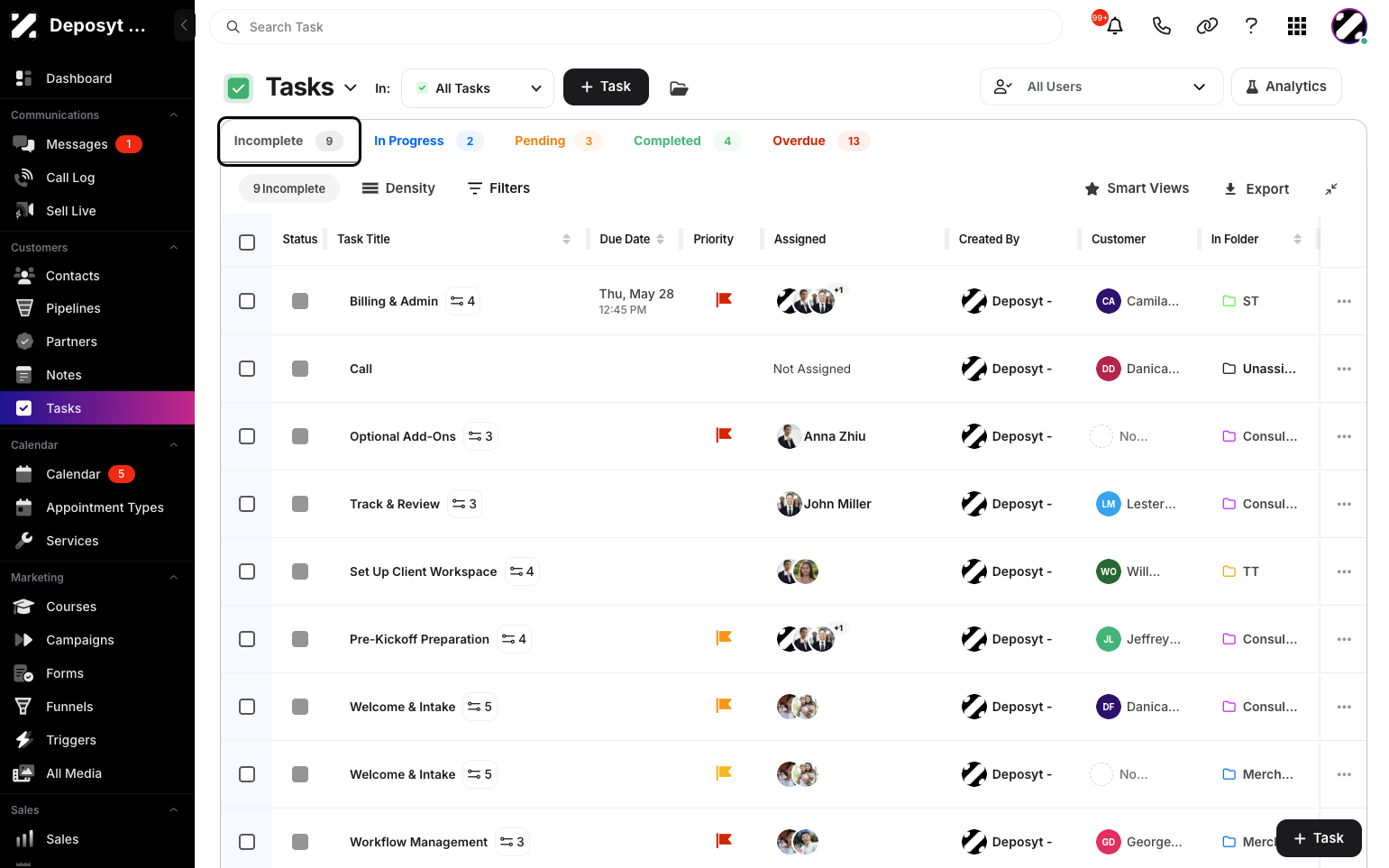
Viewing All Incomplete Tasks lets you see all tasks that are still pending or not yet completed. This helps you track outstanding work, prioritize actions, and ensure timely follow-ups.
Follow these steps to view all incomplete tasks:
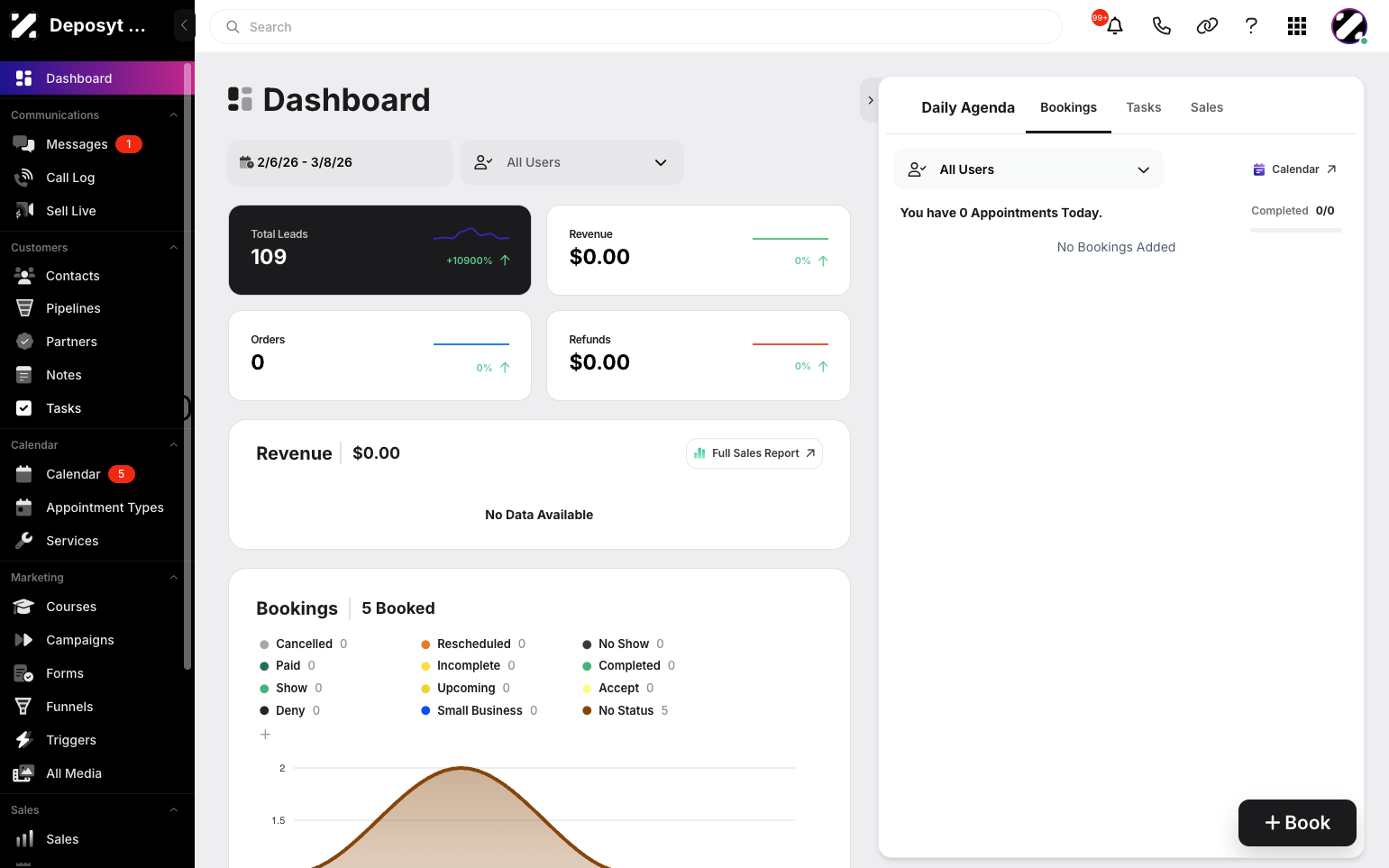
Step 1: On your Dashboard, navigate to the Tasks tab under the Customers section.
Step 2: Click the ‘Incomplete’ tab to view all incomplete tasks.
No related posts.
Table of Contents